

Forecasts on Your Home Screen
Add beautiful widgets to your home screen and lock screen for instant access to sunrise, sunset, and golden hour forecasts.

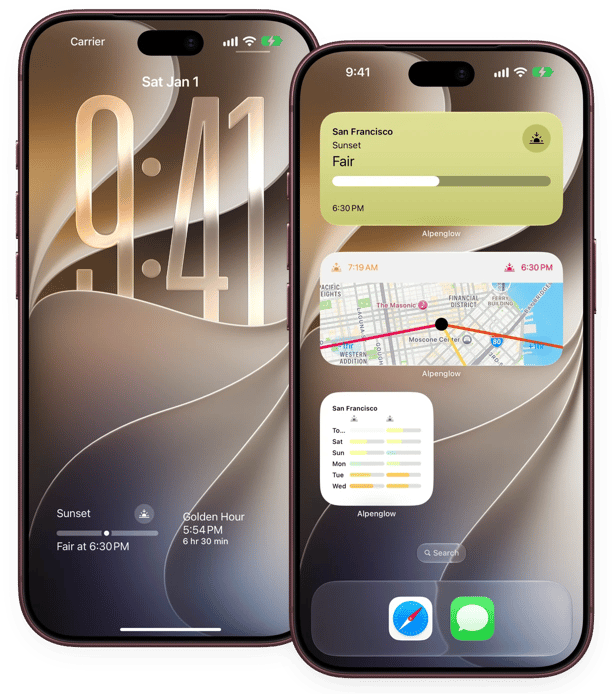
Everything at a Glance
Choose from a variety of widgets to keep track of forecasts, times, and countdowns.
Included free
- Times
- Sunrise, Sunset and Magic Hour Times for your current location shown in a handy Widget.
- Next Event Countdown
- Countdown to the next Sunrise, Sunset and Magic Hours. Using your current location the widget will show you how long till the next event.
- Sun Direction
- See where the sun will rise and set along with its current position on the map.
- Dashboard
- An extra-large widget for iPad and Mac. Times are free; add forecasts, the outlook and a map with Pro.
With Alpenglow Pro
- Quality Forecasts
- View the forecasted quality for Sunrise and Sunset right on your Home Screen. You can also use the Widget multiple times to view forecasts for multiple locations.
- Forecast Outlook
- Want to plan ahead? View the Sunrise and Sunset Forecast for up-to 7 days ahead. You can also set a location per instance of the Outlook widget to plan for multiple locations.
- Forecast Map
- See the sunrise or sunset forecast across a map right on your Home Screen. On iPhone.
Frequently asked questions
How do I add a widget to my home screen?
On your Home Screen, press and hold in an empty area until apps start moving. Tap the + button and search for Alpenglow.
Then choose your Widget & your preferred size and tap Add Widget.
How do I set a location for widgets?
Once you've added a widget to your Home Screen, tap and hold on the widget and select "Edit Widget".
Can I add Sunrise/Sunset forecasts to my home screen?
With Alpenglow Pro you can add the Quality Forecasts widget to view the next Sunrise/Sunset forecast. Or add the Outlook widget to view up-to 7 days ahead.
Can I view forecasts for multiple locations within widgets?
You can tap and hold on a widget to set a location, this allows you to add widgets for as many locations as you wish.
Why can't I add a Forecast Widget without paying?
Widgets require Alpenglow to make multiple requests throughout the day. Alpenglow has a limited number of Sunrise/Sunset forecast requests it can make in a day, so features that require additional requests are only available under our paid plans.
Are Widgets coming to Android?
Android Widgets are planned for a future release. Reach out to me via the contact form if you'd like to help beta test Android widgets.
Never Miss a Perfect Sunrise or Sunset
Get daily forecasts, quality predictions, and notifications right on your phone